Quran fonts and Tajweed colours
The script is the heart of a Quran video. Tarteel Video draws every ayah with the Mushaf fonts of the King Fahd Complex in Madinah, and offers other Quran fonts too, including a colour-coded Tajweed edition. Here is how to choose one and make it your default.
Tutorials · · 3 min read
Why the font matters
Many people learned to read the Quran from the printed Madina Mushaf, and they recognise its letters at a glance. Tarteel Video uses the page fonts of that Mushaf, so each word looks exactly as it does in print. The words are never restyled, stretched or replaced: you choose the size, colour and look of the video, but the text itself stays as printed.
Choosing a font in the editor
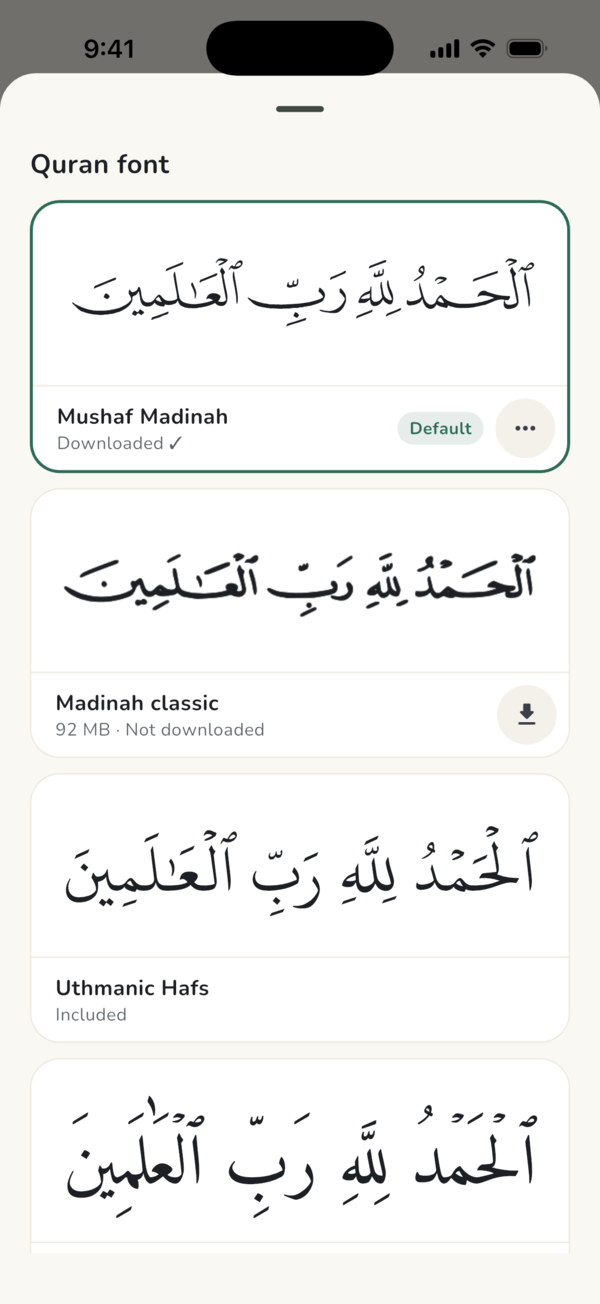
Open your project and tap the Text tab. A row of font cards shows the same ayah from your video in each script, so you can compare them side by side. Tap a card to use it. If a font is not on your phone yet, it downloads right in its card and the card shows the progress.
The fonts you can pick
Amiri Quran Colored colours the vowel marks, dots and pause signs in the manner of old manuscripts. It is a style of colouring, not Tajweed rules; for Tajweed colours, choose Mushaf Tajweed.
- Mushaf Madinah: the current print of the Madina Mushaf, drawn from its page fonts. This is the default.
- Madinah classic: the earlier print of the Madina Mushaf, for those who know its letters. It is a 92 MB download.
- Mushaf Tajweed: the Madina Mushaf with colour-coded Tajweed.
- Uthmanic Hafs: the King Fahd Complex's Uthmanic font, included with the app.
- More choices, including Amiri Quran, IndoPak, DigitalKhatt Madinah, DigitalKhatt classic, Scheherazade New, Noto Naskh and Amiri Quran Colored.
Tajweed colours
Mushaf Tajweed shows the Madina Mushaf with the letters coloured by Tajweed rule, so viewers can see where the reciter lengthens, merges or nasalises a sound. It works well for teaching videos, for children and for anyone learning to recite.
Because the colours carry meaning, keep the background calm and the text large. A darker look with a soft shadow, set in the Shadow & backdrop tab, keeps every colour easy to tell apart.
Downloads and offline use
Uthmanic Hafs and a few other fonts are included with the app. The Mushaf page fonts and the other Quran fonts download once, then work offline. The app offers to download the Madina Mushaf fonts when you first set it up, and you can carry on using it while they finish. If you skip it, the pages load one by one as you use them. Wi-Fi is best for the larger fonts.
If a font is still missing when you are offline, the app shows that ayah in Uthmanic Hafs until it can download it. To see what is on your phone, or to delete a font you no longer use, open Settings and tap Downloads, then look under Quran fonts. You can download it again any time.
Setting a default font
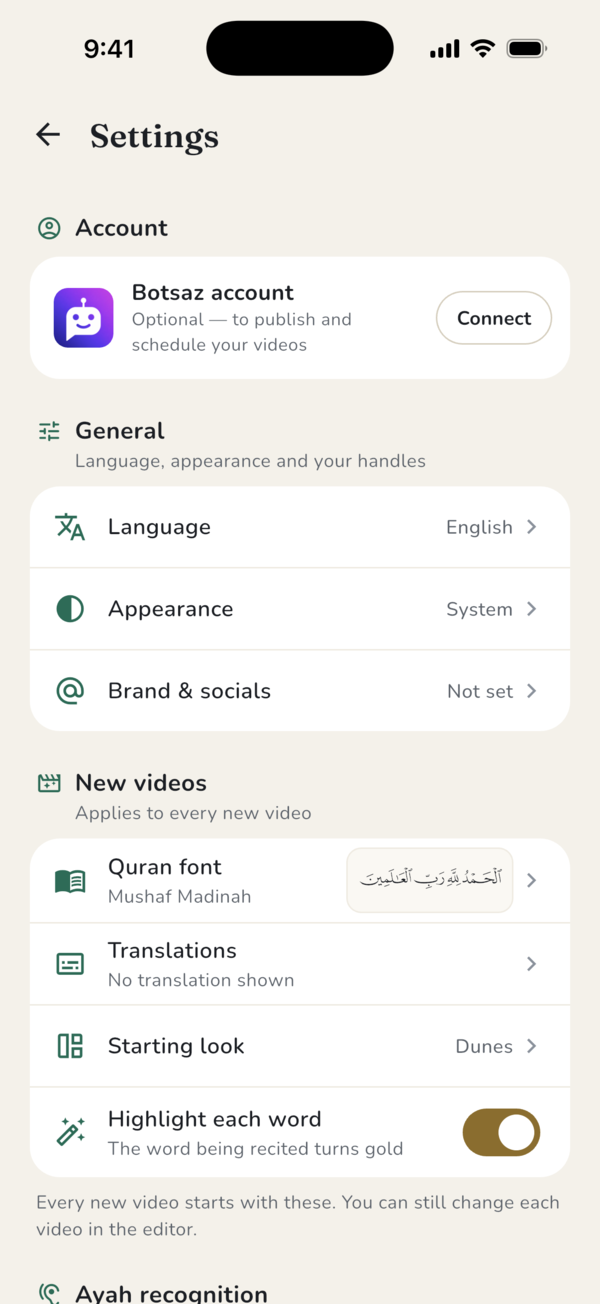
If you always use the same script, make it the default. Open Settings and, under New videos, tap Quran font, then pick one. Every new video starts with it, and you can still change the font of any single video in the editor.
Frequently asked questions
Which Quran font is the default?
Mushaf Madinah, the current print of the Madina Mushaf. You can change the default in Settings under New videos.
Does Tarteel Video support Tajweed colours?
Yes. Choose Mushaf Tajweed in the Text tab to show the Madina Mushaf with colour-coded Tajweed.
Do the fonts work without internet?
Yes, once downloaded. Uthmanic Hafs is included; the others download once and then work offline.
Can I change the shape of the letters?
No. The Quran text is never restyled. You can change its size, the look of the video and the shadow behind it.