Publish with Botsaz, or share it yourself
When your Quran video is ready, you can save it and share it however you like, or publish it to your pages straight from Tarteel Video with Botsaz. This guide covers both, and how to put your own handles on your videos.
Tutorials · · 4 min read
Saving and sharing it yourself
Publishing with Botsaz is optional. When an export finishes, tap Save to gallery to keep the video on your phone, or Share to send it to any app, such as WhatsApp, Telegram or Instagram. A finished video that you have not saved is kept in Your projects for a few days, so save it if you want to keep it.
What Botsaz adds
Botsaz is a social media tool from the same team. With a Botsaz account connected, you can post one video to several pages at once, or schedule it for later, without leaving Tarteel Video. It works with Facebook, Instagram, TikTok, YouTube and Telegram pages that you have connected in Botsaz.
Connecting your Botsaz account
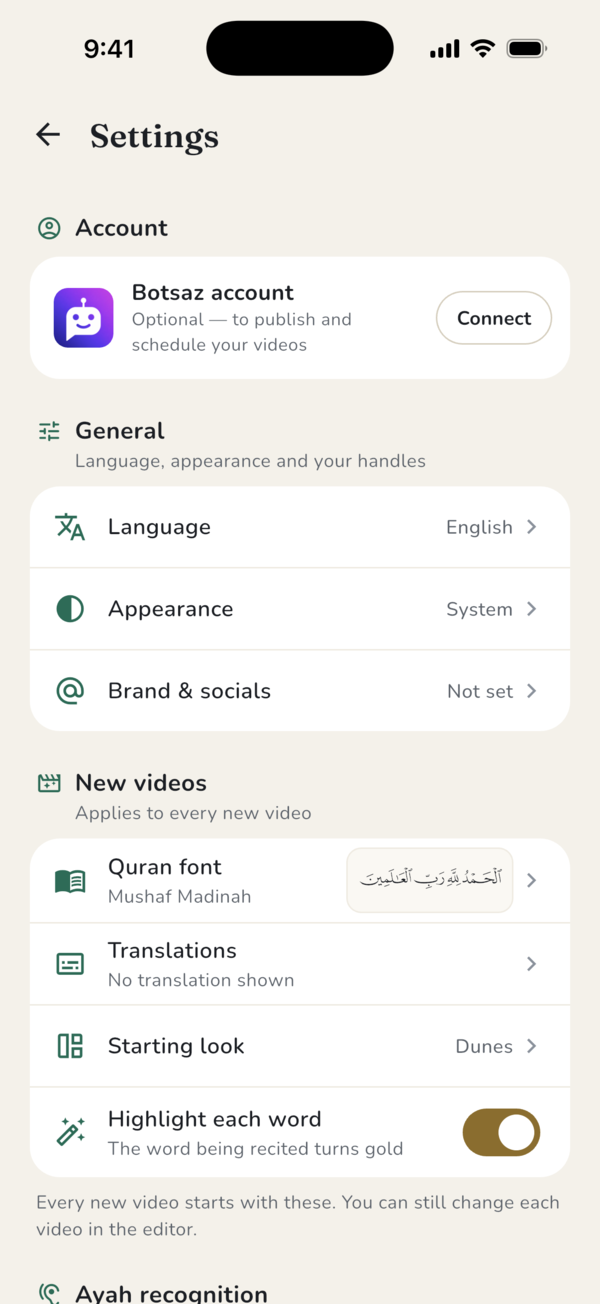
Open Settings. At the top, under Botsaz account, tap Connect. The Botsaz account is free, and you sign in with Google, Facebook or WhatsApp. Your video stays on your phone while you sign in. You can also connect the first time you tap Publish with Botsaz on a finished video.
If no pages are connected to your Botsaz account yet, the app asks you to connect your Facebook, Instagram, TikTok or Telegram page in Botsaz first, then come back.
Posting or scheduling a video
When the export is done, tap Publish with Botsaz. Choose the pages to post to under Where to publish, and tick Also share to Story where a page has stories. Then tap Next to write the caption and pick the time.
The caption is filled in for you with the surah and ayah numbers, a short part of the translation if your video shows one, the reciter's name and a few hashtags. Edit it as you like. Under When, choose Now to publish straight away, or Schedule to pick a date and time at least five minutes ahead.
- YouTube needs a title. The app suggests one from the surah and the reciter.
- For TikTok, choose who can watch: Everyone, Friends, Followers or Only me.
- If a page accepts only shorter or smaller videos, the app makes a smaller copy on your phone before the upload, and tells you.
- Scheduling depends on your Botsaz plan.
After you publish
Keep Tarteel Video open until the upload finishes. After that, Botsaz publishes the video for you, and you can close the app. The result screen shows each page as Published, Still publishing or Couldn't publish here, and you can follow each one in Botsaz. If your Botsaz team needs to approve posts, the video waits for approval first.
While a Botsaz plan is active, your videos are exported without the Tarteel Video mark and closing card.
Your handles on every video
Viewers who like a video should be able to find you. Open Settings, tap Brand & socials and add your handles for Instagram, TikTok, YouTube, Facebook, Telegram, X or Snapchat. Up to three show on your new videos. In the editor, the Brand tab has Your accounts in the video, to show or hide them and change them for a single video.
With a Botsaz account connected, you can load your handles from Botsaz and turn on Keep my handles in sync with Botsaz, so they stay up to date. Handles you typed yourself are never changed.
Sharing with care
Use recitations you own or have permission to share, and credit the reciter when you post. Videos made with the free version may also be shared by Tarteel Video on its own channels, crediting the reciter when known; they are never sold, and any video is removed on request.
Frequently asked questions
Do I need Botsaz to use Tarteel Video?
No. Botsaz is optional. You can always save a video to your gallery or share it yourself.
Is a Botsaz account free?
Yes, the account is free, and you sign in with Google, Facebook or WhatsApp. Some features, such as scheduling, depend on your Botsaz plan.
Which platforms can I publish to?
Facebook, Instagram, TikTok, YouTube and Telegram pages connected to your Botsaz account.
How many handles can I show on a video?
Up to three. Add them in Settings under Brand & socials.